Make your computer
Zorin OS is the alternative to Windows and macOS designed to make your computer faster, more powerful, secure, and privacy-respecting.
Download Zorin OS

“[Zorin OS] is just so clean and polished. I don’t really anticipate a learning curve for new users.”

“Zorin OS is exactly what a desktop operating system should be”

“It has everything in terms of offering a friendly and usable experience to those coming from… Windows or macOS”

“When speed is of the essence, Zorin OS really shines”
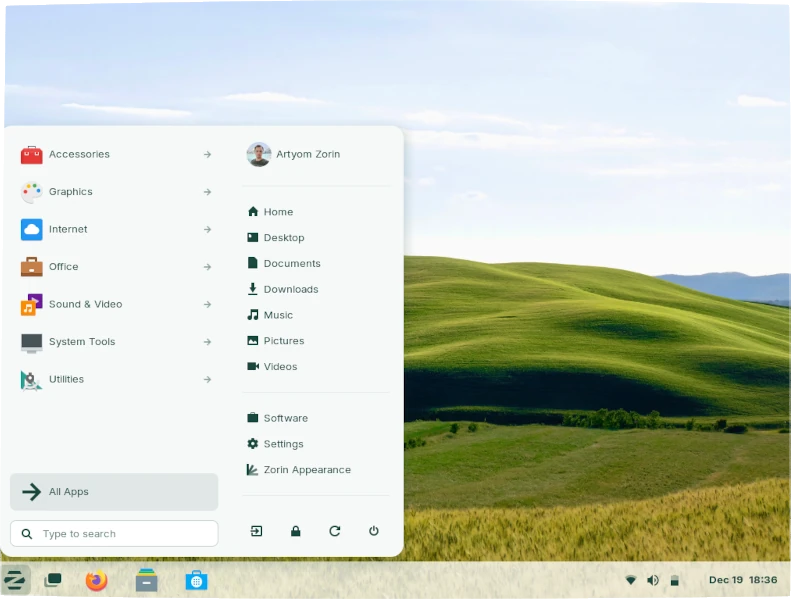
A familiar desktop you already know how to use.
Zorin OS is designed to be easy, so you don't need to learn anything to get started. The Zorin Appearance app lets you change the desktop layout to feel like the environment you're familiar with, whether it's Windows, macOS, or Linux.

Less
More Speed.
Your computer should work as fast as you do. Zorin OS runs lightning quick and doesn't slow down over time. Apps open fast, so you can spend more time being productive.

Revive your old PC. Help the environment.
We've streamlined Zorin OS to work on computers as old as 15 years. Keep using your PC for longer to save money on upgrades and reduce e-waste to help the environment.
Because of the lower hardware requirements [of Zorin OS] alone, we're expecting to extend the life of the city's PCs by 30-40%
― City of Vicenza, Italy

Reliable.
With an Ubuntu and Linux foundation, Zorin OS is built on the same Open Source software that powers the U.S. Department of Defense and computers on the International Space Station.
Secure.
Thanks to the advanced security features of Linux, Zorin OS is resistant to PC viruses and malware. Security patches and software updates arrive quickly and are available for years to come.
Privacy-respecting.
We believe privacy is a fundamental human right. That's why Zorin OS doesn't collect personal data, so advertisers and governments can't spy on your activity. Zorin OS is Open Source, so anyone can audit its source code to verify its privacy.
A world of incredible Apps.
Zorin OS comes with all the essential apps you need out of the box, so you can get working right away. Discover thousands of powerful apps from the built-in Software store. You can even run many Windows apps in Zorin OS with Windows App Support.
Ready. Set. Game!
Play an enormous library of your favorite games, whether they're AAA titles or indie games. Install native Linux and Windows games from Steam, Lutris, and other sources. Zorin OS comes with NVIDIA, AMD, and Intel graphics drivers as well as game optimizations, so you can get great performance easily.


Your phone and computer work as one with Zorin Connect.
Zorin Connect is integrated into the Zorin OS desktop to merge the experience between your computer and Android device. It works over an encrypted connection on your local network, so your data stays private and doesn't reach the cloud.
Sync notifications and messages between devices.

Send files and photos between your phone and computer.

Control your computer's mouse and keyboard.

Use your phone as a slideshow remote and presentation pointer.

Control music and video playback across your devices.

Dual boot.
You can install Zorin OS alongside Windows or macOS to keep your files and apps. You'll be able to choose which OS to use at each boot-up.
View how to install Zorin OSAccessibility.
Zorin OS is translated into over 100 languages. It includes a screen reader, magnifier, click assist, and other assistive technologies.
View accessibility featuresCompatible with your documents and files.
Your documents, music, photos, and videos just work. Zorin OS comes pre-installed with the LibreOffice suite, which lets you view, create, and edit Microsoft Office/365 documents. If you install Zorin OS alongside Windows, you can access the files on your Windows drive partition from within Zorin OS.

Make your computer better.
Join the millions who have downloaded Zorin OS. You can get started for free.
Download Zorin OS@ZorinOS is an extremely beautiful and elegant Operating System. Totally digging it.
― Rishi Giri

I like Zorin so much I named a weapon in my latest sci-fi book after it. 😊️

Changed my full time work OS to @ZorinOS and fell in love with it 😊️😊️😍️😍️. To me it looks like the OS of the future.
― Gauransh K.

@ZorinOS Just switched and could not be happier so much faster than windows 10 and looks amazing too.
― Kingek

Frequently asked questions.
Can I try Zorin OS before installing it on my computer?
Absolutely! You can run Zorin OS from a USB drive to test-drive it without touching your computer's hard drive. When you're ready to install it, simply double-click on the "Install Zorin OS" icon on the desktop and follow the step-by-step instructions on the screen.
How much does Zorin OS cost?
You can download and use the Core edition of Zorin OS completely free. For more advanced features, additional apps, and support, you can purchase Zorin OS Pro from here.
Will my computer work with Zorin OS?
If your computer is 15 years old or newer, chances are it should work with Zorin OS. You can check if your computer meets the system requirements.
If you're thinking of purchasing Zorin OS Pro and aren't sure if your computer is compatible, you can download Zorin OS Core for free to test-drive it by running it from a USB flash drive first.
Will [insert app] work in Zorin OS?
You can install a huge library of apps from the built-in Software store, including many popular apps you know and love. Zorin OS is also natively compatible with Ubuntu & Linux apps (.deb or .AppImage executables), and you can run many Windows apps by simply double-clicking on their .exe or .msi file.
How long does it take to get Zorin OS?
The time it takes to download Zorin OS and create a USB install drive will depend on your Internet connection and hardware. Zorin OS usually takes between 10 and 20 minutes to install on your computer, just enough time to have a coffee. You can find out how to install Zorin OS here.
How long will Zorin OS get software updates for?
Zorin OS 17 will receive software updates and security patches until at least June 2027. We normally release major versions every 2 years, so you'll have plenty of time to upgrade to future versions to extend support.
Kao the Kangaroo © 2022 Tate Multimedia S.A. All rights reserved. The game photo in the top image on this webpage is copyright of Tate Multimedia S.A.
Slime Rancher © 2015 - 2021 Monomi Park, LLC. All rights reserved. Developed and published by Monomi Park, LLC. “Slime Rancher” is a registered trademark of Monomi Park, LLC. The game video is copyright of Monomi Park, LLC.
No Man's Sky © 2016 - 2021 Hello Games Limited. All rights reserved. Developed and published by Hello Games Limited. “No Man's Sky” is a registered trademark of Hello Games Limited. The game video is copyright of Hello Games Limited.
Art of Rally © 2020 Funselektor Labs Inc. All rights reserved. Developed and published by Funselektor Labs Inc. “Art of Rally” is a registered trademark of Funselektor Labs Inc. The game video is copyright of Funselektor Labs Inc.